No Kubernetes? No Problem: llm-d Now Runs Anywhere

llm-d was designed as a Kubernetes-native inference stack, and its guides assume you have a cluster handy. However, a large class of inference workloads runs on infrastructure that isn't managed by Kubernetes, and until recently llm-d was not a fit for them.
With the llm-d router's new file-discovery plugin, that changes. llm-d can now run as a plain process or container in any environment, with no dependency on Kubernetes or any other cluster framework. A YAML file lists your endpoints; the router reads it and reconciles changes live. That's the whole interface.
That opens the door to deployments like:
- HPC clusters running Slurm, where GPU nodes are allocated per-job and there is no cluster API
- Ray-based training loops (VERL, OpenRLHF) where rollout workers are Ray actors, not pods
- Bare-metal inference farms provisioned statically
- Local development on a workstation with one or two GPUs
This post introduces the new endpoint-discovery plugin mechanism in the llm-d router. It then shows how to use llm-d without a Kubernetes cluster by enabling the file-discovery plugin, which reads endpoints from a YAML file on disk. We illustrate this with two concrete examples that generate the endpoints file from a Ray cluster and a Slurm job.
How llm-d normally discovers endpoints
The Endpoint Picker (EPP), the routing engine inside the llm-d router, normally watches a Kubernetes InferencePool object and the pods it selects. As pods come and go, the llm-d EPP's internal datastore is updated automatically via the controller-runtime manager.
That machinery requires a live Kubernetes API server, an InferencePool CRD, and appropriate RBAC. On an HPC cluster or a Ray job, none of that exists.
The llm-d Discovery plugin
To support alternative endpoint-discovery mechanisms, we recently introduced a general EndpointDiscovery plugin interface in the llm-d EPP framework. Anything that can enumerate endpoints and stream upsert/delete events can be plugged in: a file on disk, Consul, etcd, a custom registry, a cloud provider's service-discovery API, etc.
In the future, the existing Kubernetes watch-based discovery is also expected to move behind this interface, so all discovery paths share the same plugin model.
The interface is small (pkg/epp/framework/interface/datalayer/discovery.go):
type EndpointDiscovery interface {
    fwkplugin.Plugin
    // Start begins discovery; blocks until ctx is cancelled or a fatal error occurs.
    Start(ctx context.Context, notifier DiscoveryNotifier) error
    // Ready is used to gate request-serving until the datastore is populated.
    Ready() <-chan struct{}
}

type DiscoveryNotifier interface {
    // Upsert adds or updates an endpoint in the datastore.
    Upsert(endpoint *EndpointMetadata)
    // Delete removes an endpoint from the datastore.
    Delete(id types.NamespacedName)
}
A plugin tells the llm-d EPP about endpoints by calling Upsert and Delete on the notifier. Start runs the plugin's main loop, typically an initial enumeration of the source followed by a watch that emits further Upsert/Delete calls as endpoints come and go. Ready() returns a channel that closes once the initial enumeration has populated the llm-d EPP datastore, so request-serving can be gated on a non-empty endpoint pool.
The file-discovery plugin
The file-discovery plugin uses a plain YAML or JSON file on disk as its source of inference endpoints. The plugin reads the file at startup and optionally watches it (via fsnotify) for subsequent changes, emitting Upsert/Delete events as entries are added, modified, or removed.
When this plugin is used, the llm-d EPP has no dependency on any Kubernetes service or object: no API server, no watchers, no controller manager, no InferencePool CRD, no RBAC, no kubeconfig. It can run on a host without a Kubernetes cluster anywhere in sight.
The core llm-d EPP features are unchanged. KV-cache-utilization scoring, prefix-cache affinity, and Prometheus metrics all work identically.
FlowControl (per-flow queueing, fairness, and admission) also works in file-discovery mode. The priority bands, fairness policies, ordering policies, and usage-limit policy are configured statically in EndpointPickerConfig.flowControl (the same block the Kubernetes deployment uses). Without InferenceObjective CRDs to consult, per-request priority falls back to a default value; static bands still apply, and a per-request x-flow-fairness-id header still drives fairness within a band. Model-name rewriting (driven by InferenceModelRewrite) is the one CRD-driven feature that is not yet available outside Kubernetes; a subset of these may move behind plugin interfaces in the future.
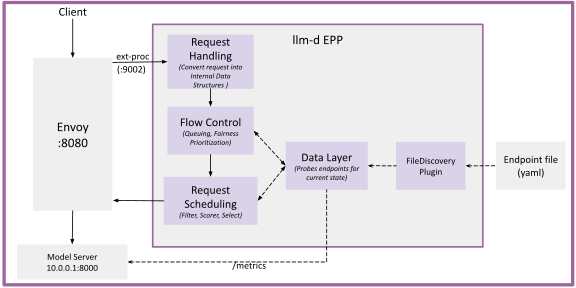
Figure 1: FileDiscovery plugin in llm-d
Try It: A Well-Lit Path
Prereqs
- A host with the GPUs your model requires, Docker (or Podman), and a Hugging Face token.
- The canonical step-by-step deployment is the No-Kubernetes Deployment well-lit path, with manifests in
guides/no-kubernetes-deployment. It includes ready-to-use llm-d EPP, endpoints, and Envoy configs (with the full optimized-baseline plugin set), Docker commands for vLLM/llm-d EPP/Envoy, verification, and a Prometheus scrape example.
The walkthrough in Setting it up below is a smaller, learning-oriented version of the same path: a minimal llm-d EPP config and a trimmed Envoy config that make the moving parts visible. Use it to understand the design; use the upstream guide to deploy.
Setting it up
The well-lit-path guide guides/no-kubernetes-deployment is the canonical, deploy-ready reference: ready-to-use llm-d EPP, endpoints, and Envoy configs (with the optimized-baseline plugin set), Docker commands for vLLM/llm-d EPP/Envoy, verification, and a Prometheus scrape example.
This section is a learning-oriented tour of the same path - the goal is to make the moving parts and the file-discovery-specific surface visible in isolation, so the upstream configs read as concrete instances of an understood pattern rather than as opaque YAML. Four pieces:
- Endpoints file - a YAML list of vLLM workers (
address,port, optionallabels) that the file-discovery plugin reads, and optionally watches for live updates. - llm-d EPP config - an
EndpointPickerConfigwith onedataLayer.discovery.pluginRef: file-discoveryline that flips the llm-d EPP off the Kubernetes path. This is the central change; everything else (scoring, picker, metrics) is the same as in any llm-d EPP config. - llm-d EPP process - runs the llm-d EPP binary or container with the config above. On startup it logs
EPP starting (file discovery mode), confirming the switch took effect. - Envoy proxy - accepts client traffic, calls the llm-d EPP over
ext_proc, and forwards each request to the address the llm-d EPP picks via thex-gateway-destination-endpointresponse header.
A final Send a request step at the end shows what a successful end-to-end response looks like.
1. The endpoints file
The plugin reads a YAML file listing inference endpoints, e.g.:
endpoints:
  - name: vllm-0
    address: "10.0.0.1"
    port: "8000"
    labels:
      model: llama-3-8b
Schema:
| Field | Required | Notes |
|---|---|---|
name | yes | Unique identifier; used as the endpoint key in the llm-d EPP datastore and in metrics labels. |
address | yes | IPv4 address of the inference worker. The llm-d EPP uses address:port for routing and for scraping the worker's /metrics. |
port | yes | TCP port where vLLM is listening, written as a string. |
namespace | no | Logical grouping tag retained from the Kubernetes data model. Defaults to "default"; most non-Kubernetes deployments leave it unset. |
labels | no | Arbitrary key/value pairs surfaced to scheduler plugins, e.g. llm-d.ai/role: prefill for P/D, or model: llama-3-8b for model-aware filters. |
Note:
addressmust be a literal IPv4 address. Hostnames are not resolved by the plugin. The Slurm and Ray examples later in this post resolve hostnames upstream of writing the file.
2. llm-d EPP config
What turns the llm-d EPP into a no-Kubernetes llm-d EPP is a single block in the EndpointPickerConfig: dataLayer.discovery pointed at the file-discovery plugin.
plugins:
  - name: file-discovery
    type: file-discovery
    parameters:
      path: /etc/epp/endpoints.yaml
      watchFile: true        # reconcile the datastore whenever the file changes

dataLayer:
  discovery:
    pluginRef: file-discovery     # this line switches off the Kubernetes path
Wire scoring, picker, and metrics plugins around this block as you would in any llm-d EPP config. The upstream router/epp/config.yaml ships the optimized-baseline plugin mix (prefix-cache-scorer, queue-scorer, kv-cache-utilization-scorer, no-hit-lru-scorer) already wired to file-discovery and is the recommended starting point; the Kubernetes-side optimized-baseline router values are the corresponding reference for cluster deployments.
watchFile: true enables live reload: the llm-d EPP upserts new endpoints and deletes removed ones whenever the file changes, without a restart. This is the key property that makes dynamic environments, where workers appear and disappear, work correctly.
3. Start the llm-d EPP
epp \
  --config-file /etc/epp/config.yaml \
  --pool-name my-pool \
  --grpc-port 9002 \
  --grpc-health-port 9003 \
  --metrics-port 9090
--pool-name and --pool-namespace are arbitrary labels for metrics and logs in file-discovery mode; they don't reference any Kubernetes object. On startup the llm-d EPP logs EPP starting (file discovery mode), and endpoints file changed, reloading on each subsequent reload when watchFile: true. The upstream guide covers the container and build-from-source options.
4. Envoy config
The llm-d EPP picks an endpoint but doesn't proxy traffic. Envoy (or any compatible proxy) accepts the client request, calls the llm-d EPP over ext_proc, reads the x-gateway-destination-endpoint header that the llm-d EPP sets on the response, and forwards the request to that address using its ORIGINAL_DST cluster type. The Envoy config is fully static; no Kubernetes service discovery involved.
This is the same shape as llm-d's standalone deployment mode. The upstream router/envoy/envoy.yaml is a host-friendly Envoy config wired exactly this way and works alongside the llm-d EPP config above. The standalone Helm chart llm-d-router-standalone/values.yaml is the Kubernetes-side reference; it shows the health_checks and transport_socket (TLS) blocks worth adding when Envoy and the llm-d EPP run on separate hosts (e.g. Envoy on a Slurm head node and the llm-d EPP on a service node).
5. Start Envoy
envoy -c /etc/envoy/envoy.yaml
Requests to http://localhost:8080/v1/completions are now routed by the llm-d EPP to one of the vLLM instances.
6. Send a request
End-to-end completion through Envoy -> llm-d EPP -> vLLM:
curl -s http://localhost:8080/v1/completions \
    -H 'Content-Type: application/json' \
    -d '{
        "model": "llama-3-8b",
        "prompt": "Hello, world!",
        "max_tokens": 32
    }'
A successful response is a standard OpenAI-compatible completion:
{
  "id": "cmpl-...",
  "object": "text_completion",
  "model": "llama-3-8b",
  "choices": [
    { "index": 0, "text": " ...", "finish_reason": "length" }
  ],
  "usage": { "prompt_tokens": 5, "completion_tokens": 32, "total_tokens": 37 }
}
You can also confirm the llm-d EPP datastore is populated and being scored via the metrics endpoint:
curl -s http://localhost:9090/metrics | grep inference_pool
A 503 with no_healthy_upstream typically means the llm-d EPP gRPC connection from Envoy is down; see Troubleshooting for the common failure modes.
P/D disaggregated setup
llm-d also supports prefill/decode disaggregation (P/D), where the compute-bound prefill stage and the memory-bandwidth-bound decode stage run on separate workers and the KV cache is transferred between them. The deployment is two pools: prefill workers running vLLM directly, and decode workers running vLLM behind a pd-sidecar that orchestrates remote prefill and the KV transfer.
The full deployment recipe (sidecar flags, vLLM kv-transfer-config, NIXL/RDMA setup, llm-d EPP plugin wiring with disagg-profile-handler and prefix-based-pd-decider, and the scheduling profiles) is documented upstream and is identical for non-Kubernetes deployments. Use those as the reference:
llm-d/guides/pd-disaggregation: end-to-end deployment guide.llm-d-router/docs/disaggregation.md: request-lifecycle and component reference.llm-d/guides/pd-disaggregation/router/pd-disaggregation.values.yaml: canonical P/D llm-d EPP config (full plugin set with prefill and decode profiles).
The only thing this post adds is how to swap Kubernetes-driven discovery for the YAML file. Two changes:
- Add the file-discovery plugin and
dataLayer.discovery.pluginRefto the upstream P/D llm-d EPP config (same as in the single-pool setup earlier in this post). - Mark each endpoint's role in the YAML with the
llm-d.ai/rolelabel:prefillfor prefill workers,decodefor decode workers. For decode endpoints, theportis the pd-sidecar's port, not vLLM's. The router's prefill/decode filters select candidates by this label.
endpoints:
  - name: prefill-0
    address: "10.0.0.10"
    port: "8000"            # vLLM directly
    labels:
      llm-d.ai/role: prefill

  - name: decode-0
    address: "10.0.0.20"
    port: "8000"            # the pd-sidecar's port
    labels:
      llm-d.ai/role: decode
The full set of role label values (including combined roles like prefill-decode and encode-prefill-decode) is listed in bylabel/roles.go.
Integrating with non-Kubernetes orchestrators
Integrating llm-d in file-discovery mode with any non-Kubernetes environment comes down to two things:
- Run llm-d (llm-d EPP, Envoy, and the llm-d sidecar where applicable) on a node that can reach your vLLM workers, using the configs and commands from the Setting it up section above.
- Produce the endpoints file in the format shown above, using whatever source knows your worker set.
The first step is the same everywhere; the second is where most of the integration work lives. The right approach depends on how dynamic the worker pool is. There are a few common patterns, all of which use the same llm-d EPP config:
- Static file - hand-edited or templated once at deployment time. Right when the worker set is known up-front and stable: bare-metal racks, lab machines, a fixed pool of long-lived services. No live reload needed;
watchFilecan stay at its defaultfalse. - Generated once at startup - a script that asks the orchestrator for the current worker set and writes the file before the llm-d EPP starts. Simplest dynamic path; works well when the worker set is fixed for the duration of a job (an HPC allocation, a single training run).
- Regenerated on change - a small monitor process or job hook that rewrites the file via atomic rename whenever the worker set changes: a node failed, a training round completed and rollouts were respawned, an autoscaler added or removed capacity. With
watchFile: truethe llm-d EPP reconciles automatically without a restart. - Orchestrator-native discovery plugin (future work) - for the most dynamic case, where workers come and go faster than is comfortable to track via a regenerated file. A dedicated
SlurmDiscovery,RayDiscovery, or similar plugin against the sameEndpointDiscoveryinterface would talk to the orchestrator's API directly and emitUpsert/Deleteevents without any file in the loop.
The source of truth varies by environment - Ray's Python API, Slurm's $SLURM_JOB_NODELIST, a CMDB or inventory tool, a cloud provider's service-discovery API, or just a static configuration - but the output format is always the same YAML schema as the endpoints file.
The two examples below show patterns 2 and 3 end to end, for Ray and Slurm.
Ray
In a Ray deployment, vLLM workers run as remote processes on Ray cluster nodes. The Ray Python API exposes the current cluster membership, including node IP addresses, so generating the endpoints file is straightforward.
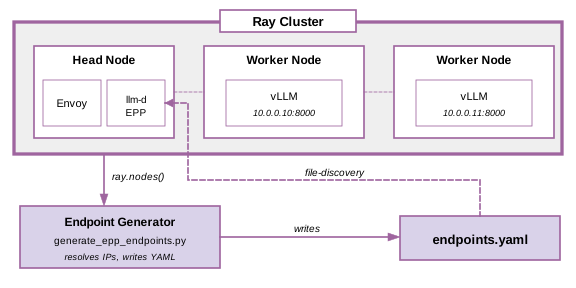
Figure 2: Endpoint generator queries the Ray head node and writes endpoints.yaml.
#!/usr/bin/env python3
"""
generate_epp_endpoints.py

Usage: python generate_epp_endpoints.py [vllm_port] [output_path]

Run this after Ray workers are started and before launching the llm-d EPP.
"""
import ray
import yaml
import socket
import sys

VLLM_PORT = int(sys.argv[1]) if len(sys.argv) > 1 else 8000
OUTPUT    = sys.argv[2] if len(sys.argv) > 2 else "/etc/epp/endpoints.yaml"

ray.init(address="auto")

endpoints = []
for i, node in enumerate(ray.nodes()):
    if not node["Alive"]:
        continue
    # Skip nodes with no GPU resources - they are not running vLLM
    if node.get("Resources", {}).get("GPU", 0) == 0:
        continue

    # NodeManagerAddress is the raylet's bind address - typically already an IP,
    # but resolve defensively in case a Ray deployment exposes it as a hostname.
    address = node["NodeManagerAddress"]
    ip = socket.gethostbyname(address)

    endpoints.append({
        "name":    f"vllm-{i}",
        "address": ip,
        "port":    str(VLLM_PORT),
        "labels":  {
            "ray-node-id": node["NodeID"][:12],
        },
    })

with open(OUTPUT, "w") as f:
    yaml.dump({"endpoints": endpoints}, f, default_flow_style=False)

print(f"Wrote {len(endpoints)} endpoints to {OUTPUT}")
This fits naturally into a startup sequence:
# 1. Start Ray workers and vLLM on GPU nodes (your existing orchestration)
python launch_rollout_workers.py

# 2. Generate the endpoints file
python generate_epp_endpoints.py 8000 /etc/epp/endpoints.yaml

# 3. Start llm-d EPP and Envoy
epp \
  --pool-name ray-pool \
  --config-file /etc/epp/config.yaml \
  --grpc-port 9002 --grpc-health-port 9003 --metrics-port 9090 &

envoy -c /etc/envoy/envoy.yaml &
Because watchFile: true is set in the llm-d EPP config, the endpoints file can be regenerated whenever the worker pool changes, for example between RL training rounds when rollout workers are restarted with a new model checkpoint. The llm-d EPP reconciles the change without a restart:
# Regenerate after workers are replaced for the next training round
generate_endpoints(new_worker_ips, "/etc/epp/endpoints.yaml.tmp")
os.rename("/etc/epp/endpoints.yaml.tmp", "/etc/epp/endpoints.yaml")
# The atomic rename triggers fsnotify; the llm-d EPP updates its pool automatically
Slurm
In a Slurm environment, a batch job requests a fixed set of nodes via #SBATCH --nodes. The standard approach is to designate the first node as the "head" (running llm-d EPP and Envoy) and use the remaining nodes for vLLM.
Slurm provides the allocated node list in $SLURM_JOB_NODELIST as a compact range expression like node[01-05]. The scontrol show hostnames command expands that into individual hostnames, and a short Python snippet resolves them to IPs for the endpoints file.
#!/bin/bash
#SBATCH --job-name=llm-d-serve
#SBATCH --nodes=5
#SBATCH --gpus-per-node=8
#SBATCH --time=04:00:00

MODEL=meta-llama/Meta-Llama-3-8B
MODEL_PORT=8000
WORK_DIR=/scratch/$USER/$SLURM_JOB_ID

mkdir -p $WORK_DIR/epp

# --- Resolve node list -------------------------------------------------
ALL_NODES=($(scontrol show hostnames $SLURM_JOB_NODELIST))
HEAD_NODE=${ALL_NODES[0]}
WORKER_NODES=("${ALL_NODES[@]:1}")

# --- Generate endpoints.yaml -------------------------------------------
python3 - <<EOF
import socket, yaml

worker_nodes = "${WORKER_NODES[*]}".split()
port         = $MODEL_PORT
endpoints    = []

for i, host in enumerate(worker_nodes):
    # llm-d EPP requires IPs; Slurm gives hostnames
    ip = socket.gethostbyname(host)
    endpoints.append({
        "name":    f"vllm-{i}",
        "address": ip,
        "port":    str(port),
        "labels":  {"slurm-host": host, "rank": str(i)},
    })

with open("$WORK_DIR/epp/endpoints.yaml", "w") as f:
    yaml.dump({"endpoints": endpoints}, f, default_flow_style=False)

print(f"Wrote {len(endpoints)} endpoints")
EOF

# --- Copy llm-d EPP and Envoy configs to work dir ----------------------------
cp /path/to/epp-config.yaml $WORK_DIR/epp/config.yaml
cp /path/to/envoy.yaml      $WORK_DIR/envoy.yaml

# Patch the config to point at the correct endpoints file path
sed -i "s|/etc/epp/endpoints.yaml|$WORK_DIR/epp/endpoints.yaml|g" \
    $WORK_DIR/epp/config.yaml

# --- Start vLLM on each worker node ------------------------------------
# Each worker uses all 8 GPUs on its node via tensor parallelism. Adjust
# --tensor-parallel-size to match --gpus-per-node, or split into smaller
# replicas (e.g. 2x TP4) if the model fits.
GPUS_PER_NODE=8
for i in "${!WORKER_NODES[@]}"; do
    srun --ntasks=1 --nodes=1 \
         --nodelist="${WORKER_NODES[$i]}" \
         --gpus-per-node=$GPUS_PER_NODE \
         vllm serve $MODEL \
              --port $MODEL_PORT \
              --tensor-parallel-size $GPUS_PER_NODE &
done

# Wait for vLLM to finish loading weights before llm-d EPP starts polling.
# Cap the wait so a stuck worker (OOM, weight download failure, etc.) fails
# the job instead of holding the SBATCH allocation idle until --time expires.
MAX_WAIT_SECS=1800   # 30 minutes
echo "Waiting for vLLM workers to be ready..."
for node in "${WORKER_NODES[@]}"; do
    waited=0
    until curl -sf "http://$node:$MODEL_PORT/health" > /dev/null 2>&1; do
        if (( waited >= MAX_WAIT_SECS )); then
            echo "ERROR: $node not ready after ${MAX_WAIT_SECS}s, aborting" >&2
            exit 1
        fi
        sleep 5
        waited=$(( waited + 5 ))
    done
    echo "  $node ready"
done

# --- Start llm-d EPP + Envoy on the head node --------------------------------
srun --ntasks=1 --nodes=1 --nodelist="$HEAD_NODE" \
    epp \
        --pool-name slurm-$SLURM_JOB_ID \
        --config-file $WORK_DIR/epp/config.yaml \
        --grpc-port 9002 \
        --grpc-health-port 9003 \
        --metrics-port 9090 &

srun --ntasks=1 --nodes=1 --nodelist="$HEAD_NODE" \
    envoy -c $WORK_DIR/envoy.yaml &

wait
For jobs where the serving pool may change during the allocation (a node fails and is replaced, or model weights are swapped), the endpoints file can be atomically replaced and the llm-d EPP will reconcile without downtime:
python3 regenerate_endpoints.py > $WORK_DIR/epp/endpoints.yaml.tmp
mv $WORK_DIR/epp/endpoints.yaml.tmp $WORK_DIR/epp/endpoints.yaml
Troubleshooting
A few failure modes that trip up first-time deployments:
addressis a hostname, not an IP. The llm-d EPP rejects entries whereaddressdoesn't parse as an IP. Slurm and Ray surface hostnames, so resolve them withsocket.gethostbyname(or equivalent) before writing the file.- llm-d EPP can't reach vLLM's metrics port. The llm-d EPP scrapes
/metricson each endpoint ataddress:port. If a host firewall or a network policy blocks that port from the llm-d EPP node, scoring plugins silently degrade to default values: routing still works, but KV-cache scoring becomes meaningless. Check the llm-d EPP's pool-health metrics on--metrics-portto confirm endpoints are reporting. - Envoy returns 503 with
no_healthy_upstream. Almost always means the llm-d EPP gRPC connection is down. Check that the llm-d EPP is running onlocalhost:9002, that--grpc-portmatches Envoy'sauthority, and (if you added thehealth_checksblock) that the llm-d EPP's gRPC health service is enabled. watchFile: truedoesn't pick up an edit. The watcher reacts to fsnotify events on rename/replace, which is whatmv tmp finalproduces. Editors that truncate-then-write (somevimconfigurations, certain IDEs) may emit a different event sequence and either double-fire or miss. Always update the file via atomic rename, as both examples in this post do.- vLLM hasn't finished loading weights when the llm-d EPP starts. If the llm-d EPP scrapes a vLLM that isn't yet serving, the endpoint shows up as unhealthy and gets excluded until the next reconcile. The Slurm script avoids this by polling
/healthon each worker before starting the llm-d EPP; do the same in any orchestration that doesn't already gate on readiness.
Parity with the Kubernetes-native llm-d deployment
The file-discovery plugin gives you most of the llm-d routing stack outside of Kubernetes:
- KV-cache-utilization scoring: routes requests away from instances with high cache pressure
- Prefix-cache affinity: sends requests with shared prompt prefixes to the instance most likely to have them cached
- Saturation-based admission: the saturation detector still gates request admission, so a saturated pool sheds load rather than overloading backends.
- FlowControl (per-flow queueing and fairness): works with priority bands, fairness, and ordering policies configured statically in
EndpointPickerConfig.flowControl. WithoutInferenceObjectiveCRDs, per-request priority falls back to the configured default; thex-flow-fairness-idrequest header drives fairness within a band. - Prometheus metrics: llm-d EPP exports scheduling and pool health metrics on
--metrics-port
What is no longer handled by llm-d outside Kubernetes is endpoint lifecycle: there is no automatic deregistration when a vLLM process dies. This responsibility shifts to the surrounding framework or orchestrator (Ray, Slurm, a custom controller, etc.) which needs to detect failed workers and rewrite the endpoints file accordingly. For production deployments, this typically means adding a health-monitoring agent that drops unavailable workers from the file.
What's next
The file-discovery plugin is the simplest non-Kubernetes integration point. It works well when the worker pool is relatively static and changes infrequently; regenerating the file at those transitions is enough. For environments where the worker set churns more frequently, a static file with periodic regeneration still works but requires external orchestration to keep it in sync.
Additional / future plugins. The EndpointDiscovery interface is intentionally minimal so more plugins can be added as the need arises. A few directions we expect to see:
- Orchestrator-native plugins: a
RayDiscoveryorSlurmDiscoveryplugin that talks to Ray's Python API or Slurm's controller directly, emittingUpsert/Deleteevents as workers change without any file in the loop. Useful for highly dynamic worker pools. - Service-registry plugins: Consul, etcd, or a cloud provider's service-discovery API as the source of endpoints.
- Migrating Kubernetes discovery to a plugin: the existing watch-based Kubernetes path is currently wired into the llm-d EPP directly. Moving it behind the same
EndpointDiscoveryinterface would unify all discovery paths under a single model and remove a special case from the llm-d EPP.
RL integration. We are currently working on integrating the no-Kubernetes llm-d with RL frameworks that run on Ray and Slurm (VERL, OpenRLHF). Our next blog post will cover that integration and initial results. This will include a custom EndpointDiscovery plugin that registers and deregisters endpoints in real time as Ray actors come up and are torn down between training rounds. We will also show how llm-d's prefix-cache routing translates into a concrete throughput benefit for the repeated-prompt patterns typical of RLHF rollouts.